Raw Data Sharing vs Tool Calling: Two Ways to Give AI Your Business Data
You can give an AI your data by pasting or uploading it, or by letting it call tools that fetch exactly what it needs. The difference decides whether your AI leaks data, makes up numbers, or can be trusted with real questions.
Every business that wants AI to answer questions about its own operations hits the same question early: how does the model actually get to see our data?
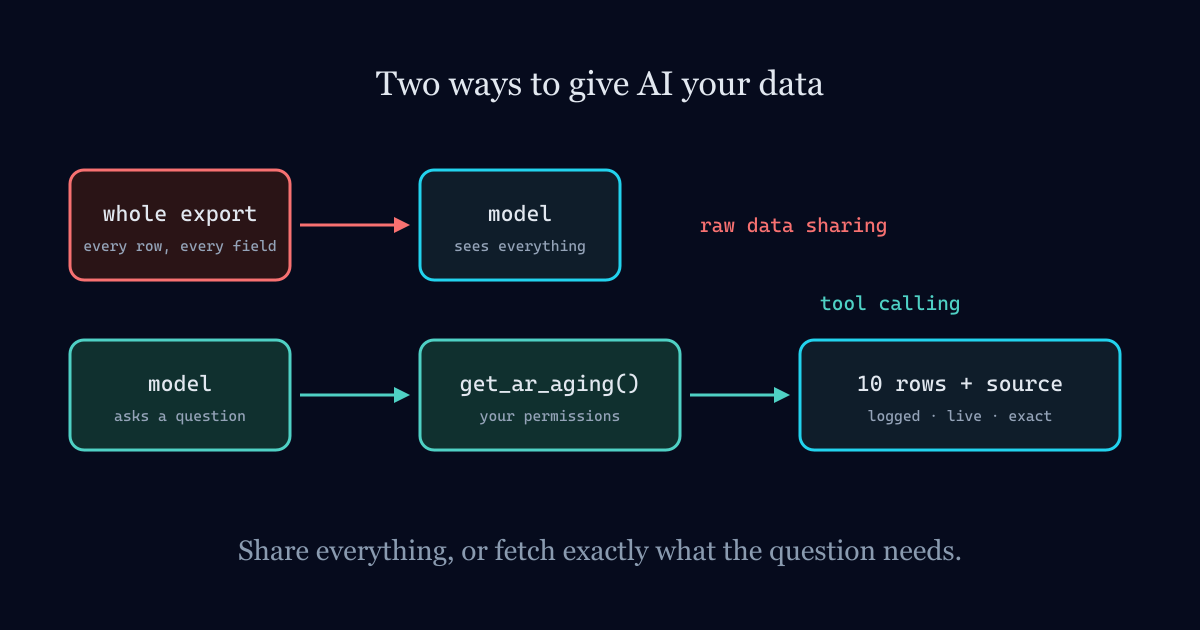
There are two very different answers. One is to hand the model the data itself, by pasting a spreadsheet, uploading an export, or stuffing a database dump into the prompt. The other is to give the model a set of tools it can call, like "get receivables aging" or "look up customer history," and let it fetch only what the question needs.
They can produce answers that look identical in a demo. Underneath, they behave nothing alike.
Approach 1: Raw data sharing
This is where almost everyone starts, because it's easy. Export last month's sales to CSV, drop it into a chat window, ask "who were our top customers?" It works, and it feels like magic the first time.
The trouble shows up as soon as you rely on it.
The model sees everything, whether it needs it or not. Ask about one customer and you've still shared every customer, every price and every margin in that file with the AI provider. If an employee does this with payroll, you've shared everyone's salary. There's no concept of "this user is only allowed to see their own branch."
The data is stale the moment you paste it. The answer reflects the export, not your business right now. An invoice posted ten minutes ago doesn't exist as far as the model knows.
Big data doesn't fit, so it gets summarized or cut. Models have limited context. Give one a large file and it will work from part of it, or skim it, and it won't always tell you it did.
The math is done by the model. Language models are not calculators. Ask one to total 4,000 rows and you'll get a number that looks right. It often won't be exactly right, and in accounting, "close" isn't an acceptable answer.
There's no record. Nobody can later say who shared what with which AI, or what the model saw when it produced an answer someone acted on.
Approach 2: Tool calling
In a tool-calling setup, the model never gets a pile of raw data. Instead it gets a menu of well-defined functions, each with a clear description of what it does and what it returns. When a user asks a question, the model decides which tool to call, your system runs the actual query, and only the result comes back.
Ask "who owes us the most?" and the model calls something like
get_receivables_aging(sort="largest"). Your own software runs the query against the live
database, does the arithmetic properly, and returns the top ten rows. The model's job is to pick the
right tool and explain the result in plain language.
That shift changes almost everything:
- Least data necessary. The model sees ten rows of an aging report, not your whole ledger.
- Permissions actually apply. The tool runs as the person asking. If they can't open payroll on screen, the payroll tool refuses for them too.
- Answers are live. The query runs against current data every time.
- Numbers come from your system, not the model. Totals, balances and rankings are computed by the same code your reports use.
- Every answer can cite its source. The model knows which tool it called, so it can say "from the AR aging report," and the user can open that report and check.
- Everything is logged. Each tool call, who triggered it and what it returned goes into an audit trail.
Side by side
| Raw data sharing | Tool calling | |
|---|---|---|
| What the model sees | Everything you pasted | Only what each question needs |
| Freshness | As old as the export | Live |
| Who does the math | The language model | Your own software |
| User permissions | Ignored | Enforced per user |
| Can cite sources | Rarely | Every answer |
| Audit trail | None | Every call logged |
| Can it change data? | No, but it can leak it | Only through tools you choose to expose |
| Effort to set up | Minutes | Real engineering |
Where RAG fits in
Retrieval-augmented generation (RAG) sits between the two. Instead of sharing a whole document library, the system searches it and passes the model only the most relevant passages. It's the right approach for documents, like policies, manuals and contracts, where there's no "query" to run. It's the wrong approach for numbers that live in a database, because searching for "sales figures" in text is a poor substitute for running a sales query.
Most serious business assistants end up using both: RAG over documents, tool calls over live data, and permissions around all of it.
A real example
The AI assistant in our own product, Izma Office, is built entirely on tool calling. It has 37 data lookups, covering receivables, sales analysis, payroll status, stock levels and more. It runs under the signed-in user's own permissions and is read-only by design. It names the report every figure came from and writes every lookup to the audit trail. It never sees a raw export of anyone's books, because it never needs to.
That's more work to build than "upload your CSV." It's also the difference between a toy and something a finance team can rely on.
What to do with this
If your team is already pasting company data into public chatbots, you have raw data sharing whether you planned it or not. The first step is deciding what's allowed and giving people a safe alternative. After that, the question is which of your systems should be reachable through tools, and with what limits.
That's exactly the work we do in AI agent, RAG and knowledge base development. If you're deciding how much an AI should be allowed to do once it's connected, read where to draw the line on AI boundaries next.
Building AI that has to get it right?
We build AI agents and RAG knowledge bases with the guardrails these articles describe: sourced answers, scoped permissions, full audit trails.
AI Agents & RAG →